If you have ever tried to pitch your services to a potential client on LinkedIn, you know the frustration. You send a connection request, they never accept it, and your message just sits there unseen.
On LinkedIn, messaging someone typically requires one of two things: they have to be in your connections, or you need InMail credits through a LinkedIn Premium or Sales Navigator subscription. Both options have limitations. The first depends on the other person accepting your request. The second costs money.
But there is a third way, a completely free method that lets you message relevant people even when they have not accepted your connection request. This article walks you through the exact steps.
Contents
Why LinkedIn Cold Outreach Is Difficult
When you try to message someone on LinkedIn, two conditions normally apply.
The first is that they must be in your connections. Once they accept your request, messaging becomes easy and free.
The second option is InMail credits. These come with LinkedIn Premium or Sales Navigator and allow you to reach people who are not in your network, up to a certain monthly limit.
The problem is clear. If someone is not accepting your connection request and you do not have a paid plan, you have no way to reach them directly. That is where LinkedIn Groups become your best friend.
The Free Method: LinkedIn Groups
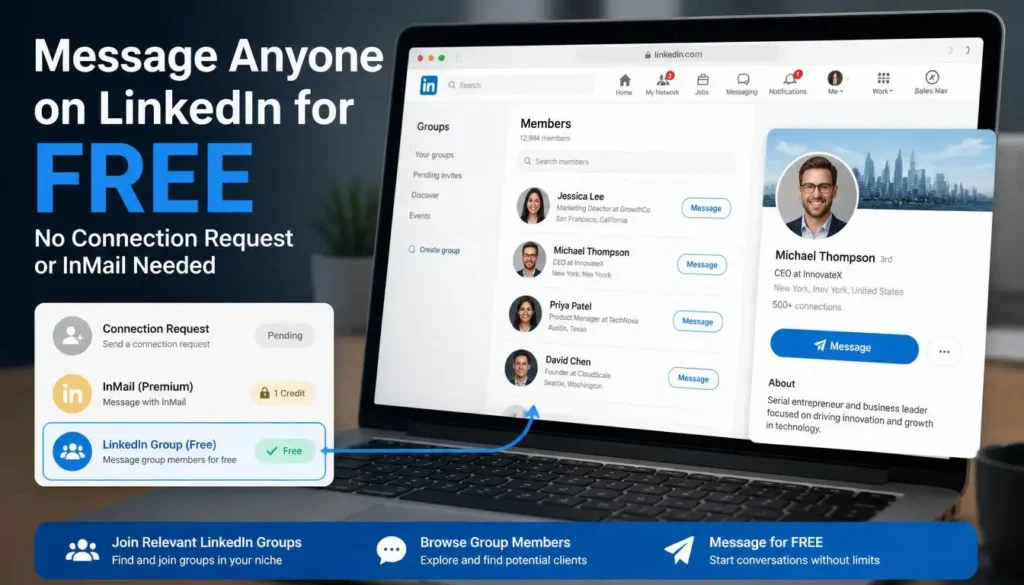
Group members on LinkedIn can message each other directly, even without being connected. This is a feature most people overlook completely.
If you and another person are both members of the same LinkedIn group, the platform allows you to send them a direct message without any connection request. No InMail needed. No Premium required.
Please note: This feature depends on LinkedIn’s current group settings and the individual member’s privacy preferences. If the Message button does not appear for a particular person, they may have restricted their messaging settings. Try other members in the same group.
Here is how to use this to your advantage.
Step-by-Step: How to Message Non-Connections Using LinkedIn Groups
Step 1: Go to LinkedIn Search
Open LinkedIn and click on the search bar at the top. Type in a keyword that is relevant to your field or the type of clients you want to reach. For example, if you offer SEO services, type “SEO” and hit search.
Step 2: Filter Results by Groups
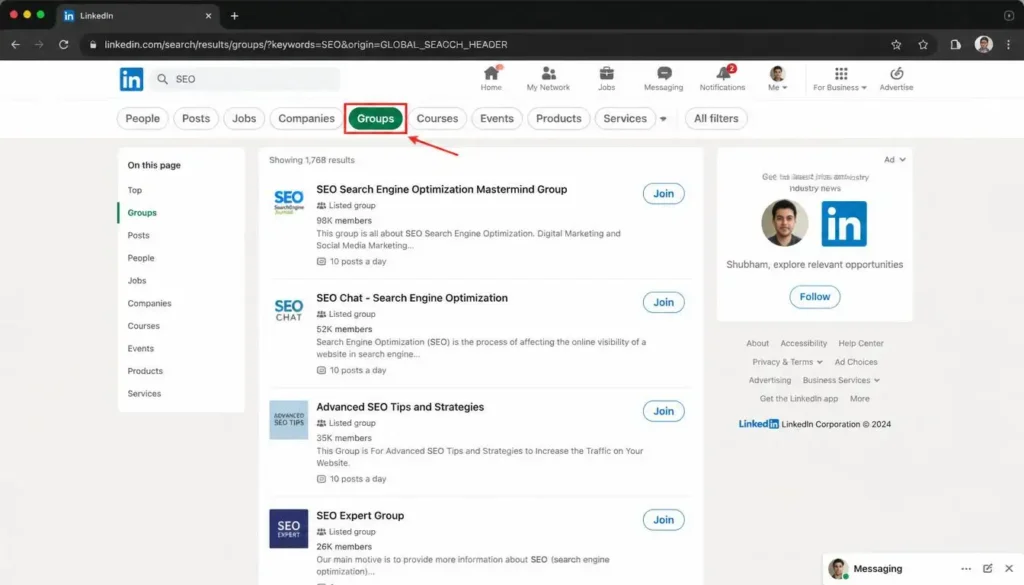
After searching, you will see several filter options across the top: People, Posts, Jobs, Companies, Groups, Courses, and more. Click on Groups.
You will now see a list of LinkedIn groups related to your keyword. Some may already show a “View Posts” button if you have already joined them. Others will show a “Join” button.
Step 3: Join Relevant Groups
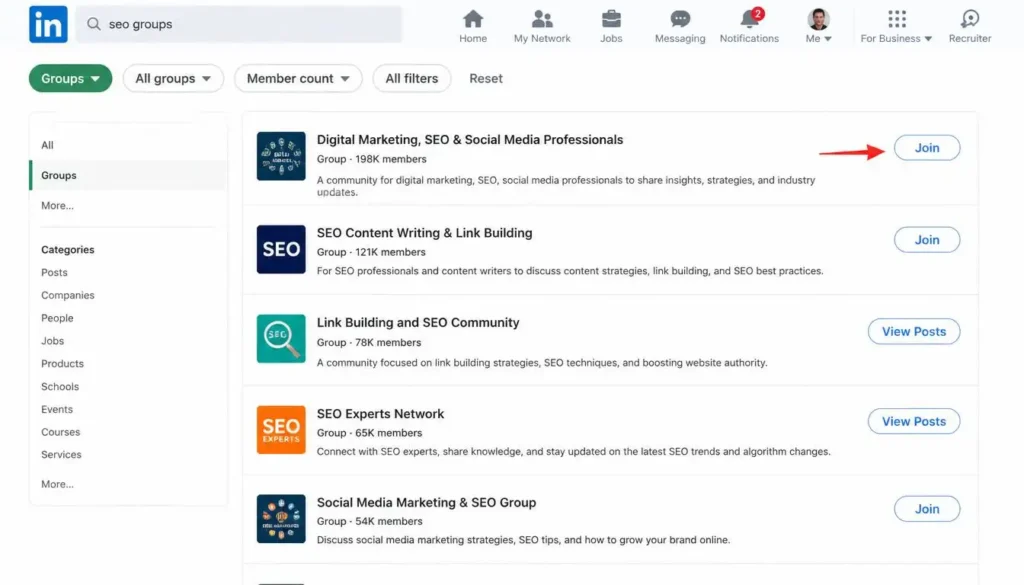
Pick groups that are most relevant to your target audience. For example, a “Digital Marketing Jobs, SEO, PPC, Social Media Specialists” group or a “Link Building and SEO” group with tens of thousands of members is a good target.
Join the group. You may need to wait a short time for approval in some cases, but many groups are open to join instantly.
Step 4: Open the Group and View Members
Once you are inside the group, look for the member count or a “See All Members” option. Click on it to browse the group’s members.
Step 5: Look for the Message Button
Here is the key part. When you browse through the group members, you will notice that many of them show a Message button directly on their profile card inside the group, even if they are not in your connections.
This is because LinkedIn allows group members to message each other. These people are not in your network, yet you can reach their inbox directly.
How to Send Messages the Right Way
Being able to message people does not mean sending the same text to everyone. That approach will get your account restricted or blocked very quickly.
Also Read: How to Setup & Optimize Your LinkedIn Profile for Client Hunting (Complete Guide)
Here is the correct approach.
Verify your LinkedIn account first. Before you start messaging anyone, make sure your account is verified. You can do this through your registered email or by using your ePassport for ID verification. A verified account is far less likely to get flagged or restricted when you are reaching out to new people.
Start with five messages per day. Do not jump into sending 50 messages on day one. Begin with five personalized messages per day. If people are accepting your connection requests, great. If not, you can still message them directly through the group.
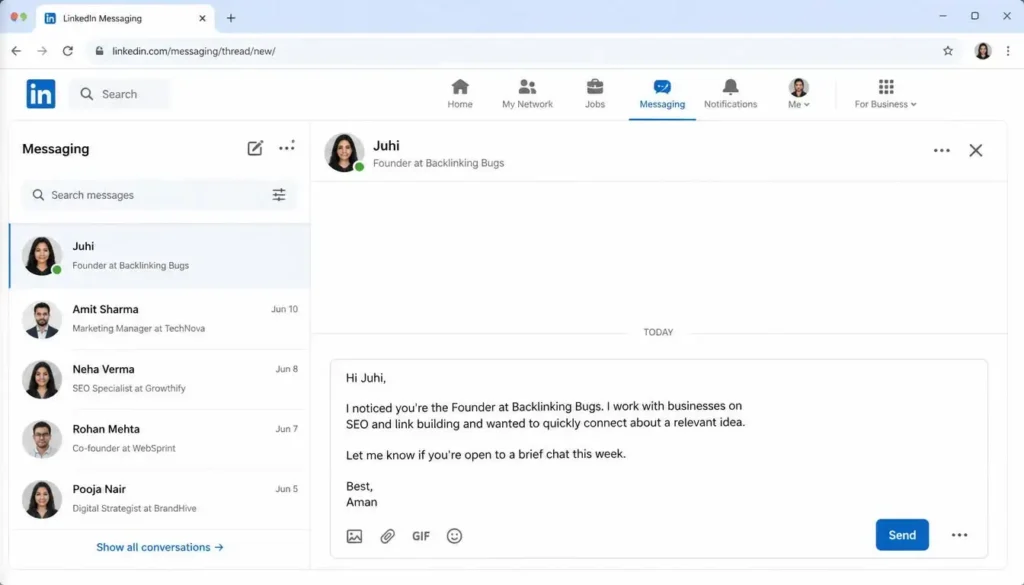
Personalize every single message. This is the most important rule. Never copy and paste the same message to multiple people. Write each message individually. Address the person by name and mention their designation or company. For example: “Hi Juhi, as you are the Founder at Backlinking Bugs, I wanted to reach out…” When someone reads a message that mentions their name and role, they immediately know it was written for them, not blasted out to a hundred people.
Pitch your services clearly. Once you have opened with a personalized line, briefly explain what you do and how you can help them. Keep it short, relevant, and focused on their potential needs.
Scale slowly and carefully. Once you are comfortable, you can increase your daily outreach. Sending 10 to 15 or even 20 personalized messages per day is perfectly fine. The key word is personalized. The more tailored your messages are, the better your chances of getting a response.
Also Read: How to Get Clients from LinkedIn in 2026 | LinkedIn Marketing Strategy for Freelancers
Who Can Use This Method?
This approach works for anyone offering a professional service on LinkedIn, regardless of their niche.
Whether you are in SEO, overall digital marketing, web development, graphic design, or any other field, this method applies equally to you. The only requirement is finding the right group where your potential clients are already active. The larger and more relevant the group, the more prospects you will find inside it.
Conclusion
Most freelancers keep waiting for connection requests to get accepted before they can start a conversation. LinkedIn Groups remove that barrier completely. Once you are inside a relevant group alongside your potential clients, you can reach them directly without spending a single rupee on Premium or InMail.
The real advantage of this method is not just access. It is the quality of the conversations you can start. A personalized message that addresses someone by name and mentions their exact role stands out in any inbox. That is what turns a cold outreach into a warm conversation, and eventually into a paying client.
Start today. Join two or three groups in your niche, find five relevant members, and write them a message that actually sounds human. That is all it takes to begin.
Disclaimer: This article is for educational purposes only. Always follow LinkedIn’s terms of service and community guidelines when reaching out to other members. Sending spam or unsolicited bulk messages violates LinkedIn’s policies and may result in your account being restricted. Use this method responsibly and professionally.